
Step height and weight shift can be changed by the therapist in the patient’s settings.
Tap the gear icon  on the lower right corner of the screen to open settings, and choose the patient’s name on the left.
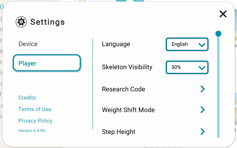
You’ll see a list on the right, and this is where you can adjust step height and weight shift settings.
These settings stick with the patient, so once they are set, they will stay the same each time the patient plays, until the therapist changes them.