---
title: ARWell PRO QR Code
description: how to log in to the ARWell or ARWell PRO software as a therapist, clinician, or patient, as well as instructions for getting the QR code login badge
---
[Skip to content](https://support.augmenttherapy.com/arwell-pro-qr-code#main-content)
English - United States
Show submenu for translations

Open main navigation
Close main navigation
- English - United States
Show submenu for translations
- [Contact us](https://d2lrq.share.hsforms.com/2_EBNcaYkRnWE6J64zZVVBQ)
[Contact us](https://d2lrq.share.hsforms.com/2_EBNcaYkRnWE6J64zZVVBQ)
How can we help you?
- There are no suggestions because the search field is empty.
1. [Augment Therapy support center](https://support.augmenttherapy.com/?hsLang=en-us)
2. [Getting started](https://support.augmenttherapy.com/getting-started?hsLang=en-us)
# ARWell PRO QR Code
## QR code for login to app
### What is a QR code and how do I get it?
Created by Paul Schwarz, Modified on Wed, 10 Sep, 2025 at 11:15 AM by Paul Schwarz
**What is a QR code/sign in badge?**
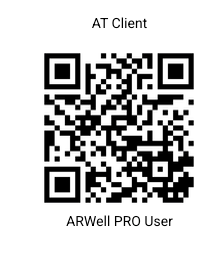
The QR code is your sign in badge (like the one shown above, unique to you). With the QR code you can log in by simply holding it in front of the camera during app login. Therapists will receive their QR code during onboarding (in an email from support@augmenttherapy.com). Patients will receive their QR code from their therapist.
**How do I get my QR code/sign in badge?**
**Provider QR Codes**
You will receive your QR code in your initial onboarding.
If you have lost it, you can log in at: [https://admin1.augmenttherapy.com/login](https://admin1.augmenttherapy.com/login) and find your badge by clicking the blue icon in the top right corner.

**Patient QR Codes - Admin Portal**
1\. Log in at: [https://admin1.augmenttherapy.com/login](https://admin1.augmenttherapy.com/login).
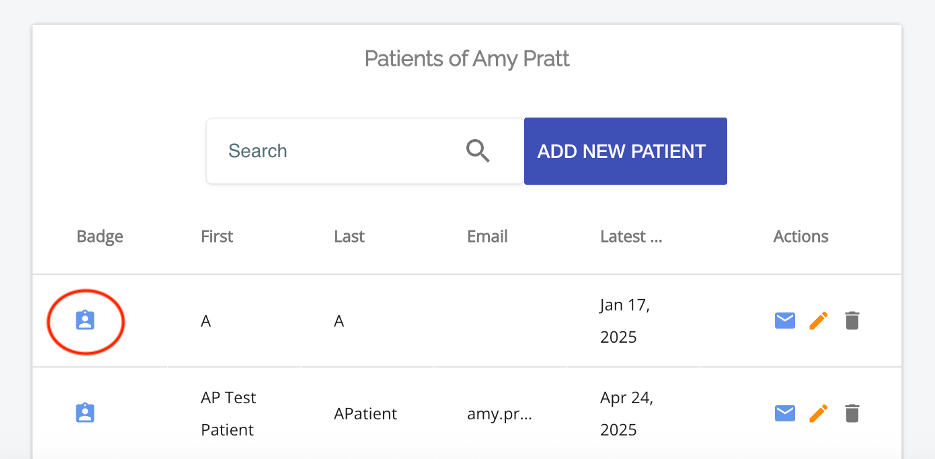
2\. In your patient list, click on the blue icon on the left to bing up the patient QR code.
3\. Print the QR code or save it as a PDF to email to your patient.
**Patient QR Codes - iOS App**
1\. Log in to the app.
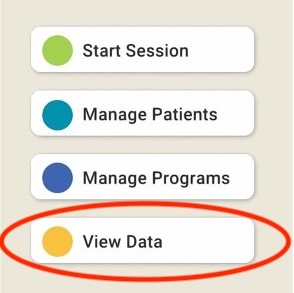
2\. Choose "View Data".
3\. Click the blue icon on the left of the screen next to the patient name (as in above image).
- [Getting started](https://support.augmenttherapy.com/getting-started?hsLang=en-us#main-content)
- [For Therapists](https://support.augmenttherapy.com/getting-started?hsLang=en-us#for-therapists)
- [Tips & Tricks](https://support.augmenttherapy.com/tips-tricks?hsLang=en-us#main-content)
- [Accessibility Settings](https://support.augmenttherapy.com/tips-tricks?hsLang=en-us#accessibility-settings)
- [Settings](https://support.augmenttherapy.com/settings?hsLang=en-us)
- [Troubleshooting](https://support.augmenttherapy.com/troubleshooting?hsLang=en-us#main-content)
- [Patient Settings](https://support.augmenttherapy.com/troubleshooting?hsLang=en-us#patient-settings)
- [Telehealth](https://support.augmenttherapy.com/troubleshooting?hsLang=en-us#telehealth)
- [FAQs](https://support.augmenttherapy.com/faqs?hsLang=en-us#main-content)
- [Therapist Questions](https://support.augmenttherapy.com/faqs?hsLang=en-us#therapist-questions)
- [Patient Questions](https://support.augmenttherapy.com/faqs?hsLang=en-us#patient-questions)
- [Manage Subscription](https://support.augmenttherapy.com/manage-subscription?hsLang=en-us#main-content)
- [ARWell](https://support.augmenttherapy.com/manage-subscription?hsLang=en-us#arwell)
[](https://www.augmenttherapy.com)
[mailto:support@augmenttherapy.com](mailto:support@augmenttherapy.com)
Copyright © 2026, Augment Therapy